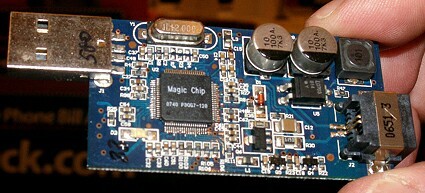
View of Magic Jack Magic Chip and circuit board with cover off.
It could possibly be your computer has an issue with its audio codecs. To quote Marc Liron (Microsoft MVP): We *ALL* have problems with Video and Audio files from time to time...even Digital Media professionals like myself! One of the biggest causes of this type of problem is "CODECS". In a nutshell, CODEC is short for Compressor / Decompressor, but don't let that scare you. THIS page at UpdateXP.com contains a link where you can download SHERLOCK - The Codec Detective! This cool FREE program was designed for Windows XP, but will also work on Vista too. If you do need it, download it, install it, then run it. Hopefully, that program will help to get you all squared away and your Magic Jack will be working fine.
On August 9th 2008, another Magic Jack user made a claim he had "found the solution" to "Fix your Magic Jack Bad Connection Problems". While I cannot confirm this (since my connections are just fine), his suggestions may be worthwhile for you to consider. As you will see, he has put his own personal reputation on the line that this could be what needs to be done to help many Magic Jack users. He should be commended for doing so. It is very doubtful this could cause any harm to your Magic Jack OR your computer and could always be reversed if need be. Could this be THE tip you have been looking for? It's possible! Why not give it a try? If it does (or doesn't) help, please send your feedback about this to him directly.


Magic Jack info provided here is compiled by a FAN of the magicJack® USB Phone Jack.
It is NOT to be confused with the Official site for magicJack® or YMAX Communications.
Magic Jack Info | Magic Jack Photos | Magic Jack Video | Magic Jack Links | Sitemap
Magic Jack USB Phone Info Copyright © 2007-10 by CutMyBills.Org. All Rights Reserved.
This web site brought to you by Carolina Web Marketing. Hosting by Carolina Web Hosting.
NO content may be reproduced, altered or redistributed without our express written consent.